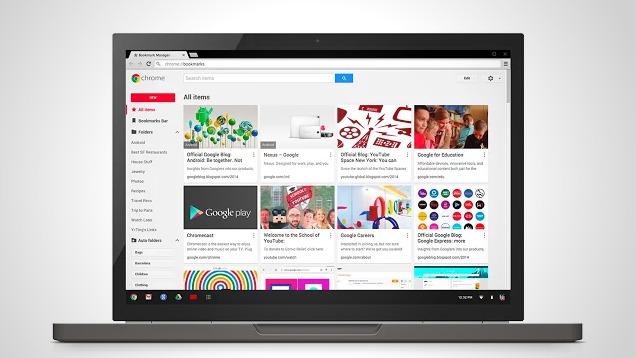
Google had already launched the Chrome Bookmark Manager extension. This new extension is to replace the old manager which was known before as Stars and the new manager is found from Chrome Store. It allows the bookmarks to get more efficient and to improve the search while the bookmarks can be done according to a certain topic and the bookmark can be shared in different places.
The following are new features for the new extension for Bookmark manager and this may include the following:
- Bookmark can be done by the topic: All the bookmarks are going to be organized under a certain topic and you may organize them in the way you wish to do it.
- The improved search: is used to search for the bookmark which had been enhanced with the Google Search and you can bookmark by the use of the snippet, content and title.
- One click save: When you want to bookmark a certain page, you can also be able to save the image or some notes so that the bookmark may be helpful.
- You can share the bookmark: You can now make a specific folder for the bookmarks to be public and to share the links with them from any place.
The new manager also helps to sync the bookmarks for all the devices.Before you install this new extension, as users, you need to sign up in the Chrome and make sure that you have enabled the sync option. After signing up, the existing bookmark may be updated with the descriptions and image whenever a user starts a certain URL bar. The latest Chrome Bookmark Manager can be found online to be downloaded.
The old bookmark manager was only basic since it only allowed the user to search for the bookmark, to move them or to put them in the folder or edit or delete them. The new bookmark manager does not only introduce the links alone but it displays the links in colorful tiles and more information are displayed as default.
The new extension has export, import, edit and search options on the top and this is improvement for the native implementation. The search had been improved since the page can be found by not only searching using the page but also by using the url, snippet and title.
The left has the display of all the folders as it was before but with an option of displaying the subfolders away or to hide them instead. The location for every bookmark has been highlighted by the tile, drop and drag operation and they are supposed to move with the bookmark around. The tiles look as if they are the placeholder icons. The new bookmark do shows the thumbnail image on the required site.
The extension adds the star icon at the toolbar and you may click on the star to bookmark it at once. This option was not provided with the old system. After clicking on the display, you have the option to click on the page, to add a custom note and to select the folder for the bookmark.