The data in your email contains a lot of private information. Keeping it safe is very important
One of the most popular mail clients out there is Gmail. There are a lot of reasons for that. One of them is that it is very safe. Google will never let their users down by compromising their sensitive information. Strong passwords, hint questions and other measures – all of them are at your service if you’re a Gmail user.
The Reasons for Logging Out
Gmail provides you with a lot of security options and there is a good reason for it. Email you’re sending contains a great deal of personal and sensitive data – your data – which can do harm to you and your close ones, if it gets into wrong hands. However, to keep your private data safe, you can’t depend only on the measures Gmail or any other mail client gives you. It is important to make sure no one can possibly get access to your account in any way. This may happen when you leave your PC turned on and forget to lock it or to log out of your Gmail account. It is good if you remember it and can quickly return to your desktop. But what if you are already far away? Fortunately, you can still do it remotely.
How to Do It?
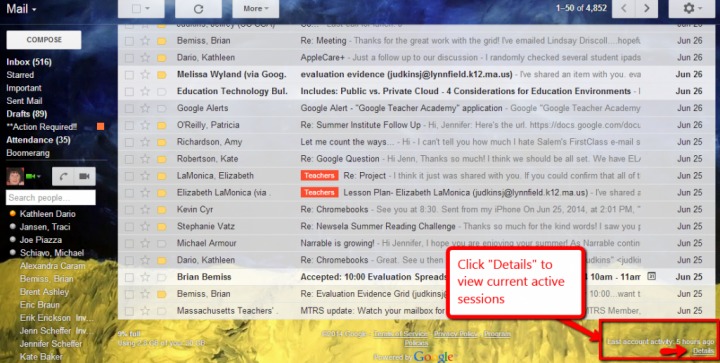
So you left your work office, came back home and then realized you forgot to log out from your Gmail on your desktop at work. What should you do? It is quite simple, really. All you need to do is log in to your Gmail account from your PC at home (or wherever you are). Then, you should scroll down to the bottom of the screen. There, at the bottom right corner, you will be able to see the last time when you signed in. Next, you should click the ‘Details’ link. You will be able to see all the IP addresses from which you or anyone else accessed your Gmail account. Also, you will be able to see if you are logged in on any other device. And the most important thing here that you now can log out of any other session thus blocking access to them and protecting your data.
Why Is It Keeping You Safe?
One of the security options Google provides you with is whenever your Gmail account is accessed from any device; it asks a security question before actually letting you or anyone else to access your account. Asking the question correctly proves that it’s you, who are accessing your account, and Google can be sure your data is not compromised. Failing to answer that question leads to Google denying access to your account, and then it will notify you about this event. It is simple, effective and ensures the safety of your information. The ability of a remote log out, on the other hand, provides you with even more security. Google actually puts you in control of the safety of your data, allowing you to manually prevent anyone from accessing your Gmail account. Having these features at hand will make you sure no one is tampering with your sensitive information.