I would like to include a word of advice before you start reading this article: always remember that every product has its pros and cons. Try not to jump to conclusions too quickly and choose carefully.
With that being said, both of these products look really good and it’s hard to choose just one (although they are quite different in some aspects).
Design, connectivity and control options
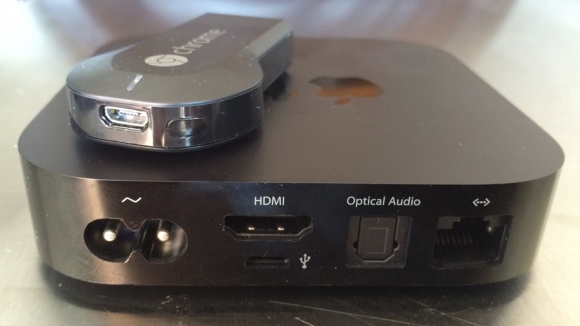
When speaking about design, I just have to mention how small Chromecast actually is. It is the smallest media player out there. All you need to do in order to connect it is to plug it into the HDMI port and power it up with an AC adapter or a USB cable (in case you’re using PC). Apple TV, on the other hand, will require some room and effort to set it up. In terms of size, it is a bit bigger than Chromecast is (but still, it is a pretty small box).
The Apple TV package includes a remote control device that is used to operate the Apple TV itself. Chromecast, on the other hand, is controlled using only your smartphone (and a Wi-Fi connection). Also, it does not require you to have a direct line of sight, unlike Apple TV’s IR powered remote.
When comparing their connectivity, Apple is a clear winner here because it has both HDMI and S/PDIF outputs. The latter is used to connect your Apple TV to an amplifier, which results in a much more clear sound. Chromecast can only be connected to the HDMI port, so it does not have the option to support additional devices.
User interface. Feedback, support
The Chromecast does not really have any interface to speak of; the only interface it has is on your phone, which you use as a remote controller. The way you communicate with the Chromecast is by “casting” content through your phone (or tablet). Apple TV, however, does have an interface (it is pretty intuitive, too). It is, of course, run on the iOS. The system itself is already set up and ready for use as soon as you buy it. If you already have an iTunes library, you can access it via cloud. The fact that it’s powered by iOS does have its problems, though. For example, it supports only Apple devices. There is a technology used to bridge the gap between Android and iOS called AirPlay, but is not fully optimized and it is not very well designed, either. Chromecast, on the other hand, provides a much better cross platform support.
Price and closing thoughts
The prices for these two are on the opposite sides of the spectrum. Chromecast is actually very cheap (only $35) wile Apple TV costs around $99. Of course, Apple does include a remote control but it does not justify such a high price, in my opinion. However, if you are an owner of other Apple products, this might be just what you are looking for. For everyone else, however, I would recommend Chromecast due to its flexibility and affordable price tag.