
How to Reset a PS5 Controller and Pair It Again
Turn off the PS5, hold the DualSense reset button for at least five seconds, then reconnect it with the official USB cable and press the PS button.
If your DualSense controller will not connect or respond, turn off the PS5, disconnect the controller, and hold the recessed reset button on the back for at least five seconds. Then connect the controller to the console with the official USB cable and press the PS button. The reset clears the controller connection state. Your PS5 games, saves, and console settings stay in place. The procedure comes directly from PlayStation Support.
How do you reset a PS5 controller?
You need the controller, the official USB cable that came with it, and a pin or similar narrow tool. Save and close anything running on the console before you begin.
- Turn off the PlayStation 5 completely. Do not leave it in Rest Mode.
- Disconnect the DualSense controller from the USB cable.
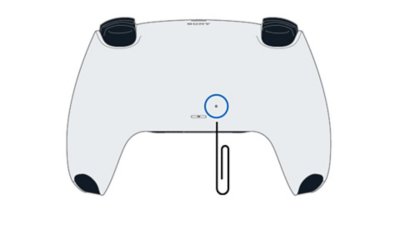
- Turn the controller over. Find the small reset hole beside the Sony logo on the back.
- Insert a pin or similar tool and press the recessed button for at least five seconds.
- Connect the controller to the PS5 with the official USB cable, then press the PS button.
Pressing the pinhole button clears the controller’s connection state. The USB connection and PS button pair it with the console again.
Where is the DualSense reset button?
The reset button sits inside a small circular hole on the back of the controller, next to the Sony logo. It is not one of the visible face, shoulder, or rear buttons. The official PlayStation locator below marks the opening.
Press gently. You should feel the recessed switch move; forcing a thick object into the hole can damage the controller shell or the switch.
How do you pair the controller again after a reset?
Connect the reset controller directly to the PS5 using the official USB cable and press the PS button. Wait for the console to recognize the controller before unplugging the cable.
If nothing happens, work through this short checklist:
- Confirm that the PS5 was fully off when you performed the reset.
- Repeat the reset and hold the button for the full five seconds.
- Use the official cable and connect it directly to the console rather than through a hub.
- Try another USB port on the PS5.
- If another controller works, update the PS5 system software before testing the reset controller again. PlayStation explicitly recommends current system software when troubleshooting DualSense issues.
Do not repeatedly reset the controller if the console never detects a wired connection. At that point, the cable, USB port, controller battery, or controller hardware may be the real fault.
What problems can a DualSense reset fix?
A reset is a sensible first step when the controller will not pair, disconnects unexpectedly, or stops responding correctly after moving between devices. It clears the controller’s existing connection state and lets you establish a new PS5 pairing.
It is not a guaranteed repair for every controller problem. A reset cannot replace a worn analog-stick component, repair a damaged USB port, or restore a failed battery. It may appear to help drift caused by a temporary input or connection problem, but it will not physically repair stick wear or contamination.
If the same button, stick, vibration, battery, or disconnection problem returns after a successful reset and software update, use PlayStation Repairs from the official troubleshooting page.
Does resetting a PS5 controller erase anything?
No. The recessed button resets the DualSense controller’s connection state. It does not factory-reset the PS5, delete installed games, remove saved data, or sign you out of PlayStation Network.
A controller reset uses the pinhole on the back of the DualSense. A PS5 console reset is a separate system-level action with very different consequences.
Can you reset the controller without a PS5?
You can press the physical reset button without the console present, but you need the PS5 and a USB cable to complete the official re-pairing procedure. If you use the DualSense on another device afterward, that device will have its own pairing steps. For a separate PS5 feature, see our guide to the PS5 web browser.
Will a reset fix PS5 controller drift?
It can rule out a temporary software or connection issue, but it cannot repair physical wear. If drift remains immediately after the controller reconnects and the console software is current, move to PlayStation’s button/analog-stick repair path instead of assuming more resets will solve it.


